





AT A GLANCE
Plan loading dock lighting for the floor, trailer interior and exterior apron. See which OSHA rules apply, compare published light-level references, and learn how to choose, position and check LED dock lights for the work at each door.
On this page
Light the Dock Floor, the Trailer and the Approach
Plan loading dock lighting as three connected jobs: overhead lights for the indoor dock floor, an aimable dock light for the trailer interior, and exterior lighting for the truck approach. Each puts light where the next part of the job happens.
Those lights serve people doing different jobs in the same space. A forklift operator needs to see the travel path, people and pallets. Someone walking across the dock needs to see the platform edge and the transition into the trailer. Checking a shipment means seeing labels and the condition of the packaging, too. A floor that looks bright from the warehouse doorway does not tell you whether all of that work is well lit.
A bright warehouse can still leave someone struggling to see inside a backed-in trailer. The trailer roof blocks the overhead light, and stacked freight creates its own shadows. Turning up the warehouse lights may brighten the doorway while leaving the next pallet hard to see. A dock arm light solves a different problem: it directs light through the opening toward the work.
Start with those visibility needs, then check the OSHA rules that apply. This guide connects loading dock lighting requirements, published light-level references, and equipment choices so you can plan and check each area.

Which OSHA Requirements Apply to Loading Dock Lighting?
The clearest numerical trigger concerns the forklift: when general lighting is below 2 foot-candles (fc), OSHA 1910.178(h)(2) requires auxiliary directional lighting on the truck. A foot-candle measures light reaching a surface; one fc equals one lumen per square foot.
For day-to-day dock planning, keep that equipment requirement alongside visibility, installation and environmental requirements:
| Provision | What it addresses | What to do |
|---|---|---|
| 1910.178(h)(2) | General lighting below 2 fc in powered industrial truck operating areas | Provide auxiliary directional lighting on the forklift. |
| 1910.178(n)(6) | The operator's view during travel | Maintain a clear view in the direction of travel; include the route into the trailer in the visibility check. |
| 1910.303(b)(2), (6) and (7)(iv) | Electrical equipment use, operating environment and damaged parts | Follow the equipment's listing instructions, match it to the exposure and address damage affecting safe operation. |
| 1926.56, Table D-3 | Construction work: examples include 3 fc for loading platforms and 5 fc for indoor warehouses | Apply these minimums within their construction-work scope. |
Use the forklift's directional lights for its travel needs and the dock arm light for the trailer work area. The 2 fc trigger concerns the truck-mounted lighting; the lighting design also needs to support the tasks people perform at the dock.
How Much Light Does Each Area Need?
Where IES RP-7 Fits
IES RP-7 is industrial-lighting guidance. The IES Industrial Lighting Committee's scope includes warehouse and storage areas, outdoor industrial areas and industrial tasks, with an emphasis on safety. That makes it relevant when setting up a dock lighting design. Select project targets for the actual work and applicable requirements, then check the installation against those targets.
Here are specific, published design references to put the scale in perspective. Their dates and project scope matter:
| Area | Reference level | Source and scope |
|---|---|---|
| Indoor loading dock floor | 10 fc maintained average at the finished floor | VA Lighting Design Manual, 2022, §7.11; a VA project design reference. |
| Adjacent staging floor | 20 fc maintained average at the finished floor | Same VA reference, distinguishing staging from the dock floor. |
| Active exterior loading dock | 10 fc horizontal minimum average; 3 fc vertical average | NYC DDC Lighting Manual, expanded 2006, exterior table; a historical design reference. |
Use these as identified references, not one nationwide minimum. “Maintained average” describes the planned average after allowing for light loss over time. Averages and individual low readings answer different questions, so record both when checking a layout.
Inside the trailer, check the surfaces people actually need to see. The floor matters for movement; upright labels and freight faces matter for reading and inspection. A good floor reading at the doorway alone tells you little about a label behind the next pallet. Set the project target for each task, then measure at the relevant surfaces and locations.
Which Fixtures Do You Need—and Why a Dock Arm Light?
Dock Arm Lights: Direct Light Through the Trailer Opening
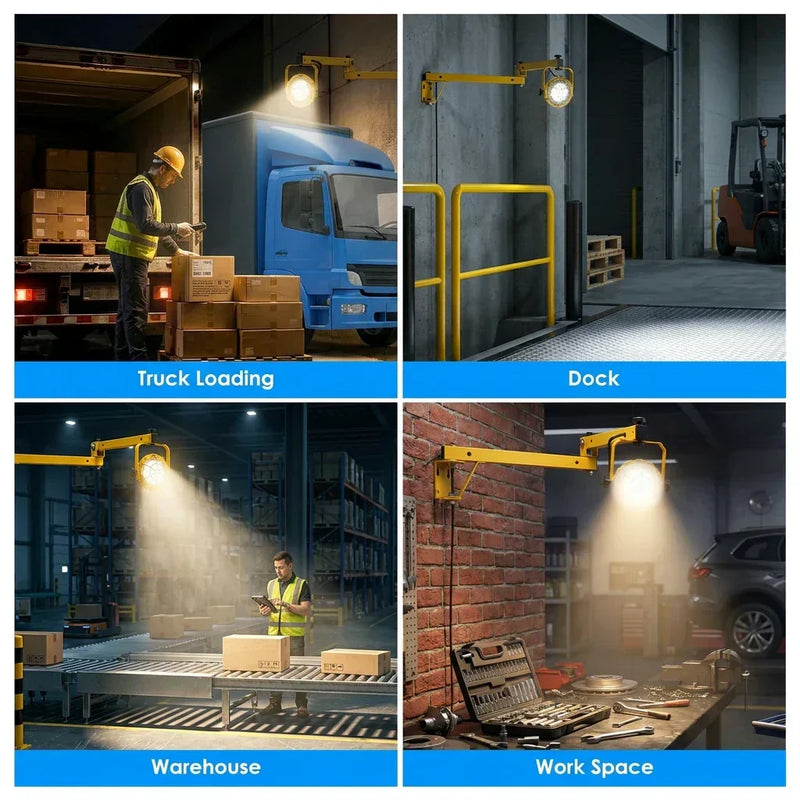
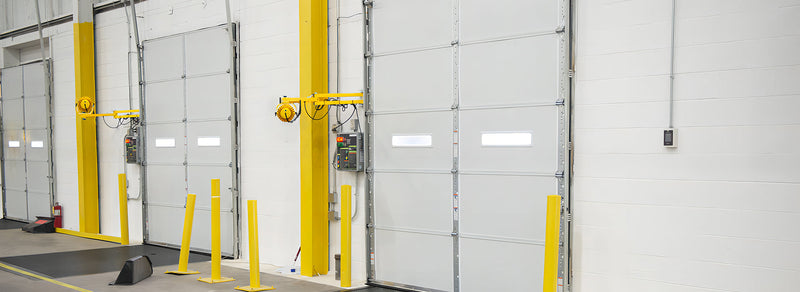
A dock arm light is an aimable lamp on a movable arm beside the dock door. Its advantage over a ceiling light is position and direction: you can aim through the trailer opening instead of relying on light from above. Compared with a handheld flashlight, it provides a hands-free light source that can stay directed at the work.
Choose an arm that reaches the required aiming position and stows clear of the door, trailer and moving equipment. Check the full swing and the cord route before fixing the mounting location. As the load changes, reposition the light so freight does not block the beam.

For a concrete product comparison, GGJIA offers the A1 Round single-arm series and B2 Round double-arm series. Both have these published output options:
| Option | Published output | Selection use |
|---|---|---|
| 30W | 3,900 lm | Evaluate this option against the required reach, beam position and work-area light levels. |
| 50W | 6,500 lm | Consider the higher output when the proposed layout needs more light; check aiming and glare at the same time. |
The 50W option provides about 67% more published lumens than the 30W option. That gives you an output difference to compare; the arm position, beam and obstructions determine how much reaches a particular working surface. The A1/B2 pages list 5000K, AC 100–277V, an IP65-rated LED lamp head and a five-year warranty. Choose between the arm arrangements by checking their actual mounting and movement against your door layout.


Overhead High Bays: Light the Dock and Staging Floors
High bays provide general light across the indoor dock floor and staging area. Plan their distribution around the travel aisles and freight positions. They work alongside the arm light: the ceiling fixtures serve the open floor, while the arm light serves the enclosed trailer.
Exterior Area Lights and Wall Packs: Light the Truck Approach
The apron is the paved outdoor area where trucks approach and back toward the dock. Choose wall-mounted or area lighting for that depth and the routes people use. Review the dock with a trailer in place, because the parked vehicle changes the shadows and what drivers can see.
Canopy and Inspection Lights: Handle the Remaining Tasks
A covered exterior dock may need luminaires under the canopy. Label reading, seal checks or close inspection may need local task lighting directed at those surfaces. Add them for an identified job rather than asking one powerful fixture to do everything.
Step-by-Step Loading Dock Lighting Design
1. Map the Three Areas and the Work
Count the doors used at the same time. Record indoor floor depth, ceiling height, exterior apron depth, trailer sizes and the tasks at each door. Mark pallets, racks and door hardware that may block light or limit arm movement. Photos from the doorway into a representative trailer are especially useful.
2. Plan Overhead Lighting for the Indoor Floor
First establish the floor and staging targets. A lumen-method estimate can help budget the overhead fixtures; a layout checks where their light lands. For a broader explanation, see our warehouse lighting design guide.
Overhead-only budgeting example: assume a 100 ft × 30 ft indoor dock area, a chosen target of 30 fc average, candidate fixtures rated at 28,000 lm, a coefficient of utilization (CU) of 0.50 and a light loss factor (LLF) of 0.85. These are example inputs, including the 30 fc target.
Area = 100 × 30 = 3,000 ft²
Estimated lumens = 3,000 × 30 ÷ (0.50 × 0.85) = 211,765 lm
Estimated fixture count = 211,765 ÷ 28,000 = 7.56, rounded up to 8 overhead fixtures.
CU accounts for how much fixture light is useful on the area; LLF allows for reduced output over time. This is an initial overhead quantity estimate. Use the candidate fixture's photometric data and actual positions to check distribution. Count trailer arm lights separately in the next step.
3. Plan Independent Trailer Lighting at Active Doors
Start the budget with one aimable light per simultaneously active door. For example, five independently used doors give an initial allowance of five dock lights. Then check each door's mounting position, trailer opening and obstructions to confirm the arrangement.
Compare the A1/B2 arm movement first, then the 30W and 50W output options. Aim at the working area, look for shadows around typical freight and check the readings there. This is how you turn a wattage choice into a useful lighting choice.
4. Complete the Exterior Apron Lighting
Lay out the approach and backing area separately from the indoor floor. Include pedestrian routes, parked trailers and any canopy. Match fixture distribution to the apron depth, then check that the proposed aiming does not put glare in the driver's view.
5. Verify the Layout, Then Check the Installed Dock
A photometric layout predicts light levels from the proposed fixtures and their positions. Check the floor, trailer work surfaces and apron as separate areas against the project's targets. After installation, use an illuminance meter at the doorway, middle and far working locations, including vertical labels where relevant. Repeat checks with representative freight in place and review glare from normal working positions.
The sequence: map the work → set area and task targets → select and position the lights → check predicted coverage → measure and adjust the installation.
Common Loading Dock Lighting Mistakes
- Judging the trailer from the warehouse floor. Check inside with a trailer backed in and freight positioned as it would be during work.
- Buying more output before checking the beam. A brighter lamp aimed into the same pallet still leaves a shadow behind it. Check for a clear light path.
- Leaving the apron out of the plan. Follow the driver and pedestrian routes beyond the door, including the spaces a parked trailer can shade.
- Ignoring transitions and glare. Review the view when moving between areas, with the door both open and closed. Re-aim exposed beams that interfere with the task.
- Letting dirt or damage undo the setup. Inspect the lens, mounting, joints and cord; a lamp that no longer holds its aim needs attention.
Best Practices for High-Volume and Specialized Docks
24-Hour Operations
Control inactive areas separately where compatible equipment allows it. Keep the routes and work positions used by the night shift illuminated. Switch and sensor placement should follow actual activity, so lights remain available while someone is inside a trailer.
Cold Storage and Washdown Areas
Specify equipment for the actual operating temperature, condensation and cleaning method. Match the complete installation—including connections—to that environment. An IP65 lamp-head rating answers a different question from suitability for a particular washdown chemical, food-processing requirement or cold-room temperature.
Hazardous Locations
For a classified location, have the classification and substances identified before selecting electrical equipment. OSHA 1910.307 addresses equipment appropriate to that classification and the gas, vapor, dust or fiber involved.
Build the Plan Around Your Dock
Gather the active door count, mounting photos, trailer dimensions, supply voltage and the tasks that are difficult to see. Those details help you compare an arm arrangement and output level without guessing from wattage alone.
Explore GGJIA LED loading dock lights, or send your project details to sales@ggjia-led.com. GGJIA offers free photometric layouts for any project size. The A1/B2 series carries a 5-year warranty.
Sources
- OSHA — 1910.178, Powered Industrial Trucks
- OSHA — 1910.303, Electrical General Requirements
- OSHA — 1910.307, Hazardous (Classified) Locations
- OSHA — 1926.56, Construction Illumination
- OSHA — Forklift Traveling and Maneuvering
- IES — Industrial Lighting Committee, Scope and RP-7
- U.S. Department of Veterans Affairs — Lighting Design Manual, 2022, §7.11
- NYC Department of Design and Construction — Lighting Manual, Expanded 2006
Frequently asked questions
Does OSHA specify footcandles for loading docks?
What is a dock arm light and why is it used?
How many dock arm lights do I need?
Are dock arm lights required for OSHA compliance?
What wattage do I need for a dock arm light?
Can I use a flashlight or portable work light instead of a dock arm light?
What's the difference between a dock arm light and a dock door light?
How often do dock arm lights need maintenance?
Are LED dock arm lights worth the upfront cost vs halogen?
Find the right light for your space.
Explore GGJIA lighting, compare your options, and get help with your next project.
JOIN THE CONVERSATION
Leave a comment
READER DISCUSSION
Discussion
No comments yet. Be the first to share your thoughts.